Proposal software for ERP systems integrators

Rigor first.
Then AI.
That is why the
output is different.

Most AI proposal tools skip the hard part. ProposalLab.ai front-loads the structured work — reading the RFP, confirming the requirements, scoring the bid, the Table of Contents, the budget — so the AI drafts on-brand, on-budget, and on-spec. Then it checks the draft against every requirement, and every time it runs again it tells you what it changed and why.

14-day free trial • No credit card required
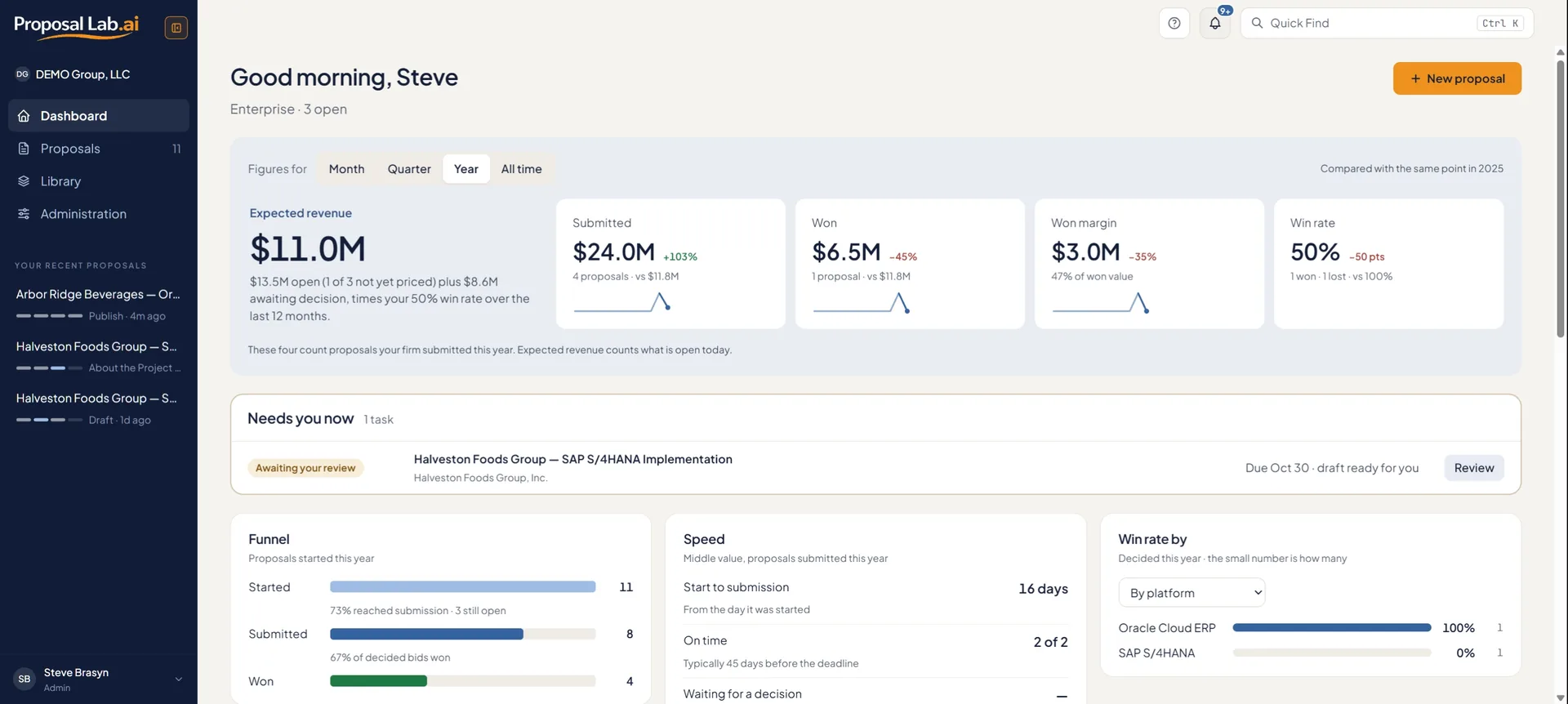
proposallab.ai/dashboard
Dashboard: expected revenue, win rate and what needs you now
Bid decisions
Bid the
right ones.
A go/no-go score out of 100, with every number linked to its source in the RFP or your Library, and what to attach to raise it.
Time saved
No more
all-nighters.
A disciplined prep phase replaces the panic sprint. Better output, same deadline — with time left to sleep before submission.
Defensibility
Every line,
traceable.
Every RFP requirement mapped to a compliance row. Selection committees follow the thread. Generic proposals do not have one.
SAP S/4HANA SAP Business One Oracle Fusion Cloud NetSuite (Oracle) PeopleSoft (Oracle) JD Edwards (Oracle) Microsoft Dynamics 365 Workday Infor CloudSuite Infor M3 IFS Cloud Epicor Kinetic Acumatica Cloud Sage Intacct Sage X3 Unit4 QAD Adaptive Deltek Odoo SYSPRO SAP S/4HANA SAP Business One Oracle Fusion Cloud NetSuite (Oracle) PeopleSoft (Oracle) Microsoft Dynamics 365 Workday Infor CloudSuite IFS Cloud Epicor Kinetic Acumatica Cloud Sage Intacct Unit4 Odoo Deltek
The problem

A competitive ERP proposal takes weeks. The process has no structure, so quality depends on how much sleep the team got.

Proposal sprawl

Content scattered across Word, Google Docs, SharePoint, and email. Nobody is sure which version is current, and the win-library decays because no one updates it.

The all-nighter

Two weeks of waiting, then two weeks of panic-writing before the deadline. Pricing gets guessed on a Friday. Half the RFP requirements get skimmed.

Generic AI output

Tools that jump straight to generation produce fluent, off-brand drafts that miss requirements. Selection committees know exactly what generic looks like.

How it works

From RFP to submitted proposal. Without the all-nighters.

The product mirrors the proposal workflow. Each phase feeds the next, so the AI generates with the constraints it needs. Shown here in full; the pricing page lists what each plan includes.

Step 1

Prepare

Drop the RFP. The client, dates, constraints and key facts are read out of it. Attach the rest — résumés, methodology, past work — from your Library.

Step 2

Qualify

Read the RFP as a team, confirm the requirements, and get a bid/no-bid score with every number linked to its source.

Step 3

Build

The Table of Contents the RFP prescribes, or a standard one for the engagement; win themes, deliverables, and a budget priced from your rate card. These are the constraints the AI writes from.

Step 4

Generate

It drafts the chapters, checks them against every requirement, and closes the gaps it can from your documents. You answer its questions, critique, route notes back, revise only what needs it, share for approval, and publish to Word. Every run is kept.

Qualify

Read the RFP as a team. Confirm what it asks. Decide whether to bid.

The RFP in place, marked up by your team and by the AI — budget, scope, risk, qualification gaps, each anchored to a page. Then every requirement extracted, de-duplicated, confirmed and given an owner. That list becomes the compliance matrix.

  • AI comments anchored to the page, beside your team's
  • Requirements extracted and confirmed, with an owner for each category or for a single requirement
  • A Bid Fit score — go or no-go — with every number linked to its source, and the RFP's own evaluation weights beside it
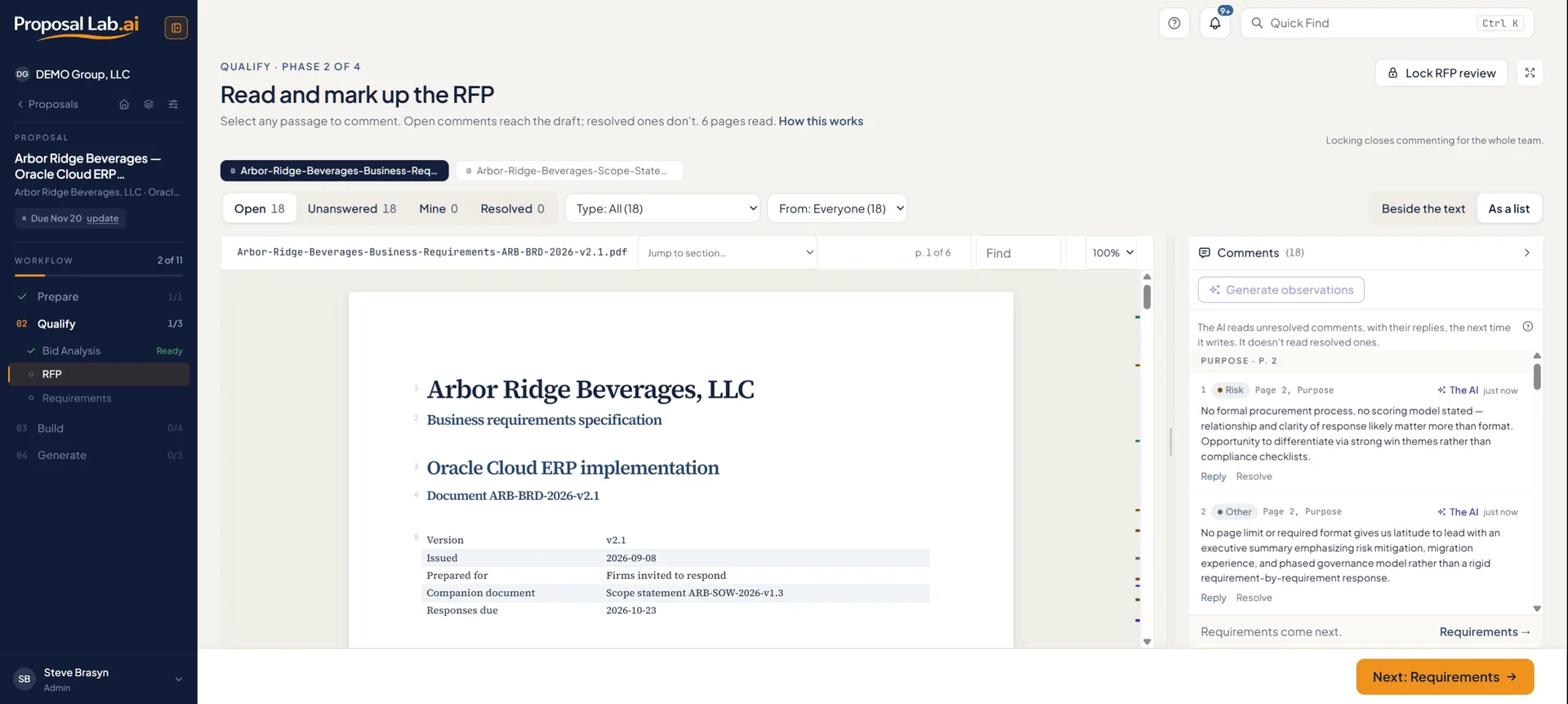
RFP: eighteen AI comments anchored to the page, beside the team's
Budget

Defensible numbers.
Not a spreadsheet guess.

Build the labor budget from your rate card — roles, rates, allocation by month. Add travel and other expenses, choose fixed price or time and materials, apply the risk premium once. The pricing chapter is written from this, anchored to numbers instead of a spreadsheet that drifts, and a time-and-materials bid carries a pricing schedule by month.

Total engagement
$4,003,840
Margin
$1,994,944
Risk premium
15%
Blended labor margin
50%
  • Roles and rates from your Library's rate card, allocated by month
  • Fixed price or Time & Materials, with the risk premium applied once
  • Locked before generation — the draft cannot quote a different number
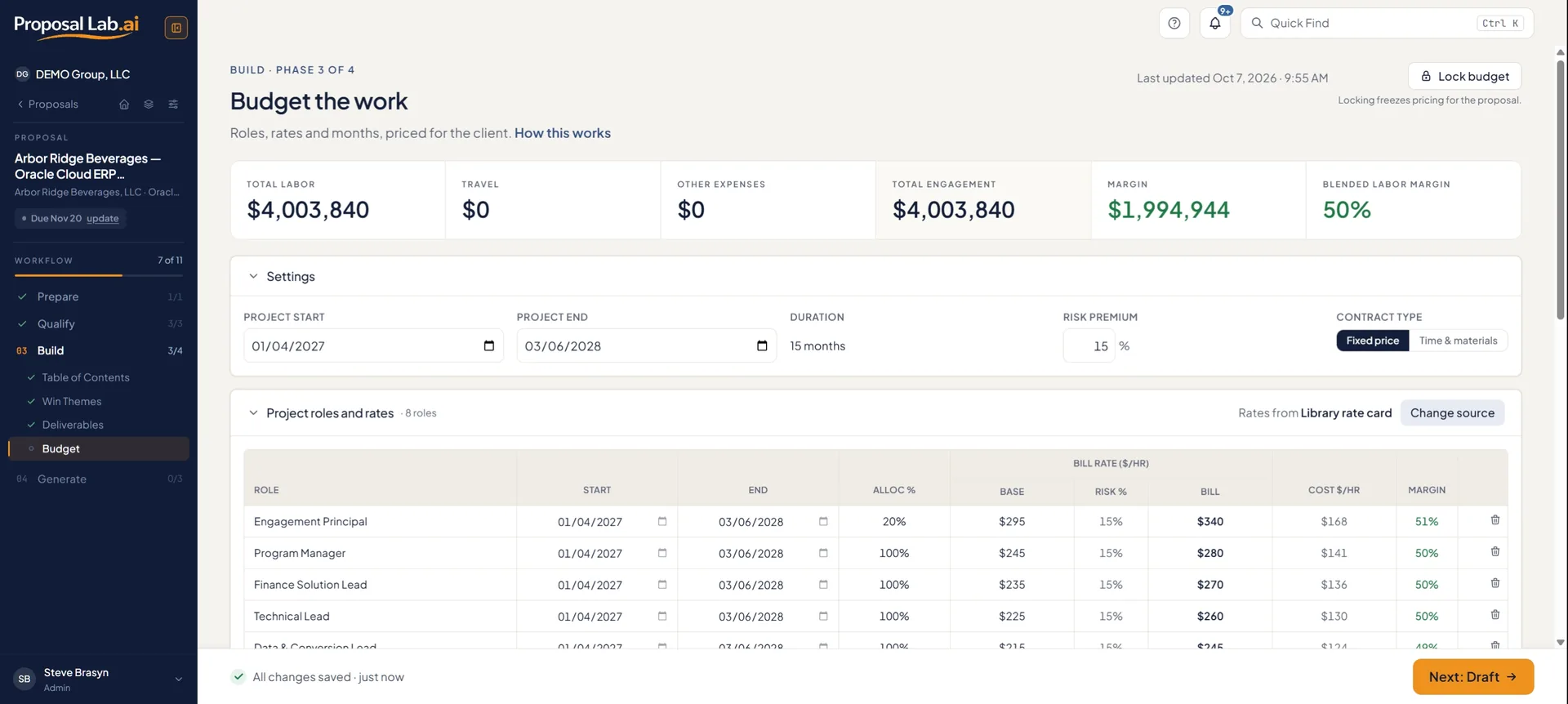
proposallab.ai/proposals/budget
Budget: $4,003,840 total engagement, 50% blended labor margin
Every run, accounted for

Regenerate without losing what was right. See exactly what changed.

The change report

Every run is kept as a numbered version. The change report says what the AI changed in each section and why — the review note, the compliance gap or the input that prompted it — as a redline on screen and as tracked changes in Word. Restore any earlier version; it comes back as a new one, so nothing is ever overwritten.

Questions for you

When the draft needs a fact only your firm has (a reference, a certification, a name), the AI asks you instead of inventing one: a numbered question, highlighted in the text and asked only once, however many chapters need the fact. Answer it, drop the claim or assign it to a colleague, and the next run writes your answer in. Until the last one is settled, the draft is marked DRAFT and the download asks first.

Revise, don't restart

Lock the sections you are happy with, or edit one yourself, and no run rewrites them. The one exception is a locked Executive Summary: when the chapters it sums up change, it is brought into line, and you are told before the run starts. Revise reopens only the sections a comment, an answered question or a compliance gap is waiting on and edits them in place; Rewrite writes everything unlocked fresh. The Draft page says what changed since the last run and suggests which.

The monthly cost of any plan pays for itself in the hours saved on the first proposal. Knowing every requirement is covered avoids unplanned project cost. And submitting more high quality proposals faster is the key to growing your business.

Pricing

Plans from $99. No sales call required.

From a single proposal for an individual consultant up to a full team workspace for a large firm. Enterprise adds SAML single sign-on, set up after order, and integrations with Salesforce and HubSpot available on October 16, 2026.

See full pricing
From the founder

"The answer was never more AI. It was more rigor, then AI. Front-load the structured work, and the output is dramatically better because the inputs are dramatically better."

"It's always easier to critique than create."

Built by someone who spent 30 years writing, reviewing, and judging ERP proposals across SAP, Oracle, Workday, and PeopleSoft.

The proposal workspace for firms that take proposals seriously.

Start your 14-day free trial: one proposal, the Pay-per-Use workflow, no credit card.

Start free trial
Features

Win more ERP proposals.
With the rigor built in.

Organized by the four phases of a proposal. The same path your team already follows, with the rigor built in. Described in full here; some features belong to particular plans — the pricing page lists what each includes.

Workspace

All your proposals in one place.

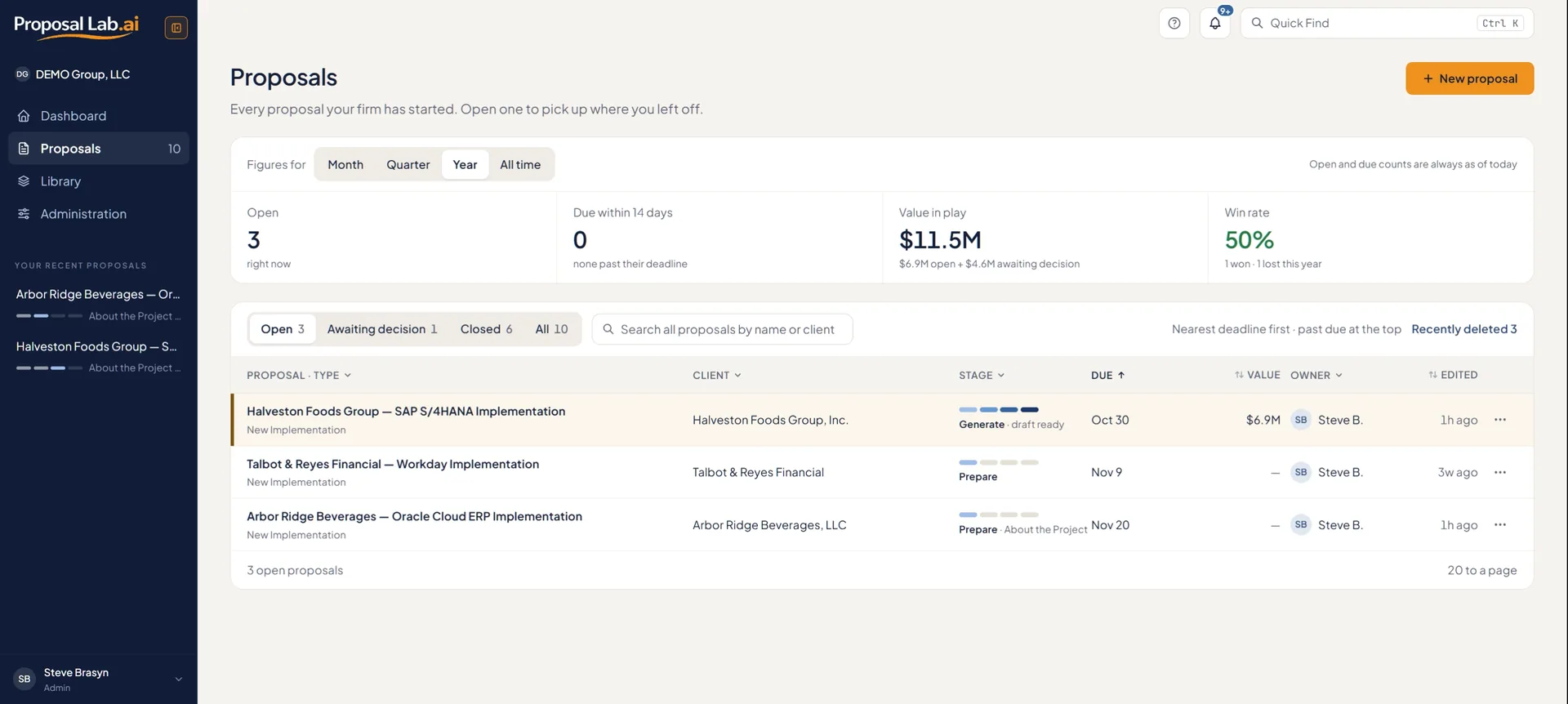
Every engagement your firm has in play, its phase, owner, due date and value. Won and lost bids stay on record — win rate by industry, platform and owner is built from them.

  • Pipeline, funnel and velocity on one dashboard
  • Phase and step for every bid, at a glance
  • One workspace, one source of truth
  • Fits a laptop: the sidebar folds to a rail, and the reading pages have a focus mode
  • Deleted something by mistake? A proposal or Library document waits 30 days in Recently deleted, ready to restore.
Proposals: every open proposal with its stage, owner and due date
Prepare

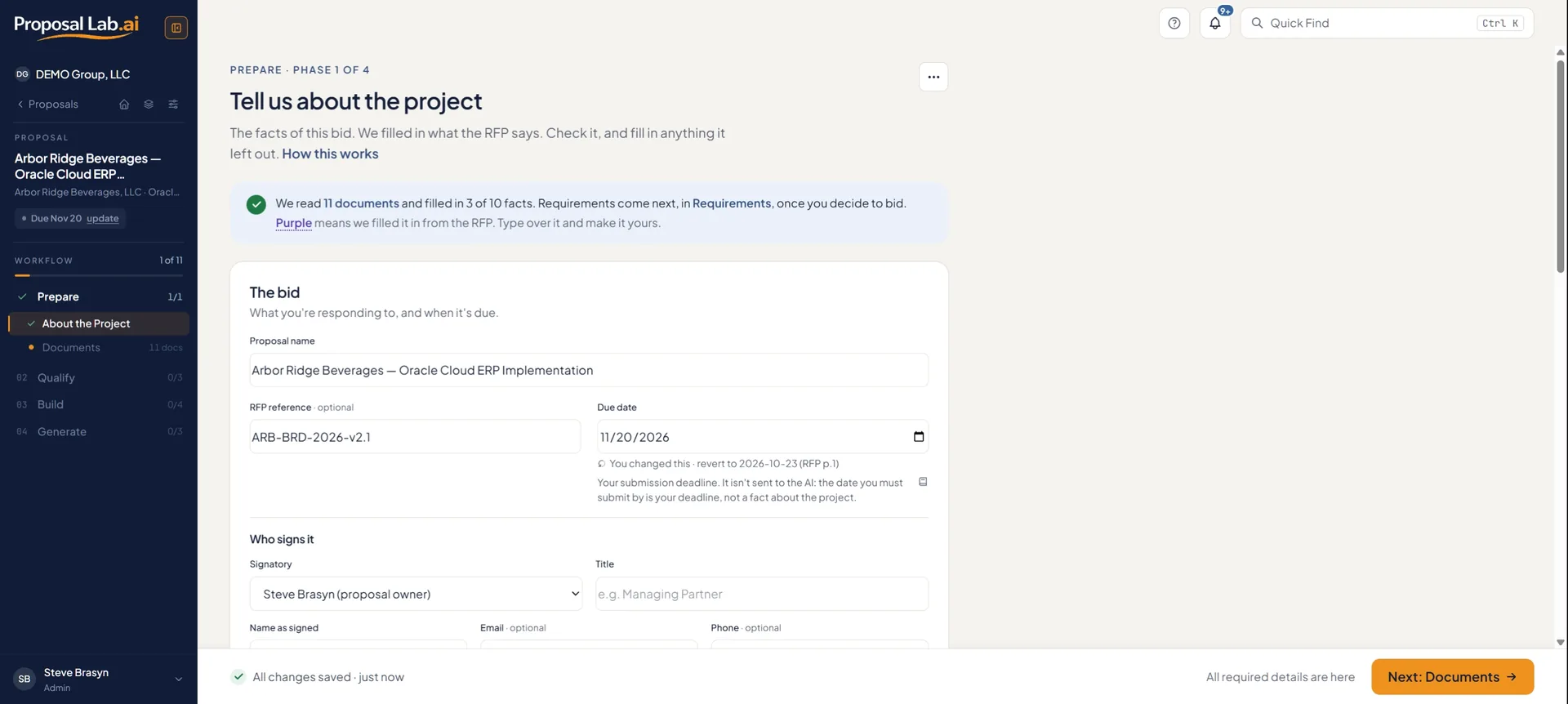
Drop the RFP. The definition fills itself in.

Client, dates, RFP reference, budget and industry come out of the document, shown in purple; click one to see the page, line and words of the RFP it came from. Type over anything and it is yours; nothing you type is overwritten.

  • Key facts read from the RFP, with page and line
  • Attach résumés, methodology, qualifications and past work from the Library
  • Gantt and org chart placed in the draft automatically
About the Project: facts filled in from the RFP, in purple, each with its source
Qualify and Build

Decide to bid. Then set the constraints the AI writes from.

RFP and Requirements

The RFP in place, with the AI's comments and your team's anchored to the page. On Requirements, extract the requirements, merge the duplicates, confirm them and give each category, or a single requirement, an owner. That list becomes the compliance matrix. Requirements come from the RFP and from any requirements document you attach: PDF, Word or a spreadsheet.

Bid Analysis

A Bid Fit score out of 100, go or no-go, with every number linked to its source. The RFP's own evaluation weights sit beside it, never in place of it, and the page lists what to attach to raise the score.

Table of Contents

The one the buyer prescribed, built from the RFP in its own words, with a list of anything left out to add back. Or a standard one for the engagement (new implementation, upgrade, module add-on, managed services, assessment or staff augmentation), one you upload, or your firm's own from the Library. Sections renumber as you untick them. Everything before the Appendices counts toward the page limit. Résumés, the pricing schedule and the compliance matrix stay in the Appendices, and a draft that runs over is shortened once, on its own, before the run finishes.

Win Themes

Two short lists for the whole proposal: the messages the draft keeps making, and the facts that make them believable. Suggest from Bid Analysis drafts both. Every chapter reads them, so the positioning holds from the executive summary to the pricing.

Budget

Labor from your rate card by role and month, travel and expenses, fixed price or time and materials. A time-and-materials bid gets a pricing schedule appendix — hours, travel, expenses and cost by month — and a table too wide for the page turns landscape.

Lock each step

Each of the six workflow pages locks when its step is done, and the draft is generated only once all six are locked. A locked page is read-only until someone who can edit the proposal unlocks it. Lock all locks every page that is ready in one step, and says which ones it skipped and why.

Generate

It drafts. You critique. Every requirement is checked.

Compliance Matrix

Nothing falls through the cracks.

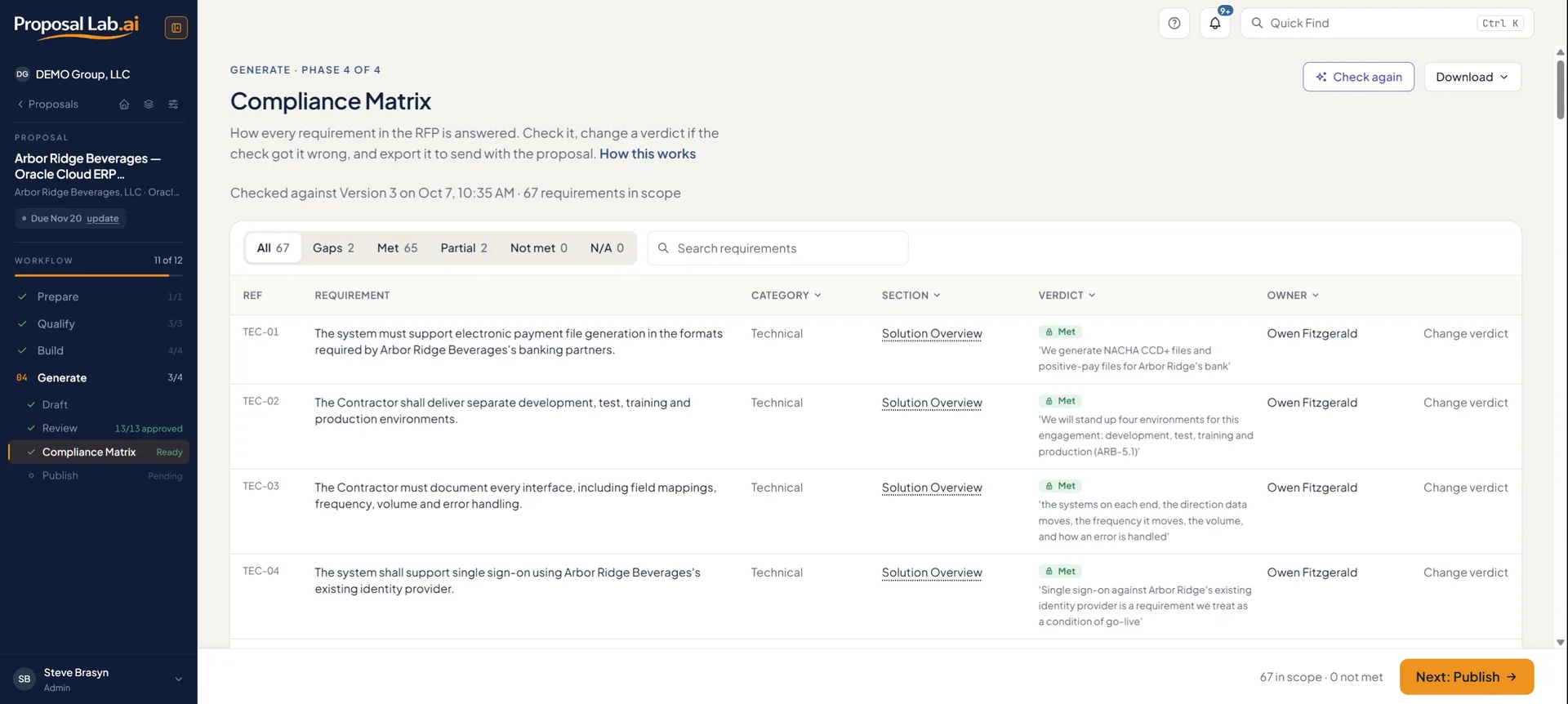
Generation writes the chapters from everything you prepared, then checks the whole draft before it finishes. The Compliance Matrix scores every confirmed requirement automatically. The run closes each gap once, using only what your documents support, and where they cannot it asks you a question tied to that requirement. Resolve what is left on Review: tell the AI what's missing for your next Revise, or mark it already covered or not applicable, with the reason. Before it finishes, the run reads the whole draft once more: a consistency check fixes places where chapters disagree, and a source check flags every claim nothing you supplied supports, as a comment for you to settle. Review then puts the AI's comments and your team's beside each section, and a comment you send to the AI is applied on your next Revise.

  • AI comments by type — factual, tone, missing, redundant, compliance gap
  • Chapter approvals: one approver, or one per section
  • Every requirement checked after every run. The run closes the gaps it can, and asks you about the rest; each requirement shows its owner, and you can filter the matrix by owner
  • After every run, the Draft page lists what needs you on Review before you share (open questions, compliance gaps, claims with no source), each one click from where it is fixed, with advice on what would make the next draft stronger
  • Close the tab: the draft runs on our servers, and you are told when it is ready or if it did not finish
  • Chapters are written several at a time, with the Executive Summary and the covering letter last so they match what the chapters say
  • Your confirmed requirements come first: if the RFP asks for time by role, a RACI chart or rates on a fixed-price bid, the draft gives them. It still never invents a fact to meet one, and never states your internal cost rates or margin.
Compliance Matrix: 67 requirements checked against Version 3

Revise or Rewrite

Lock the sections you are happy with, or edit one yourself, and no run rewrites them. The one exception is a locked Executive Summary: when the chapters it sums up change, it is brought into line, and you are told before the run starts. Revise reopens only the sections a comment, an answered question or a compliance gap is waiting on and edits them in place; Rewrite writes everything unlocked fresh. The Draft page says what changed since the last run and suggests which.

The change report

Every run is kept as a numbered version. The change report says what the AI changed in each section and why — the review note, the compliance gap or the input that prompted it — as a redline on screen and as tracked changes in Word. Restore any earlier version; it comes back as a new one, so nothing is ever overwritten.

Questions for you

When the draft needs a fact only your firm has (a reference, a certification, a name), the AI asks you instead of inventing one: a numbered question, highlighted in the text and asked only once, however many chapters need the fact. Answer it, drop the claim or assign it to a colleague, and the next run writes your answer in. Until the last one is settled, the draft is marked DRAFT and the download asks first.

Ready to share

When the draft is ready, one button on Review notifies the approvers, naming their sections, or shares it with the colleagues you pick. It warns you first if anything is still open. After a new version, only the approvers whose sections changed are told.

Edit the text yourself

Press Edit text on any section and change the wording by hand. It is marked Your text, with who edited it, and no Revise or Rewrite touches it until you hand it back.

Your words, word for word

Mark a document such as your insurance or methodology statement Use word for word. The AI decides where it belongs, the app places your exact text there, and the run tells you which section it landed in.

Library

The firm knowledge that makes every proposal feel like you.

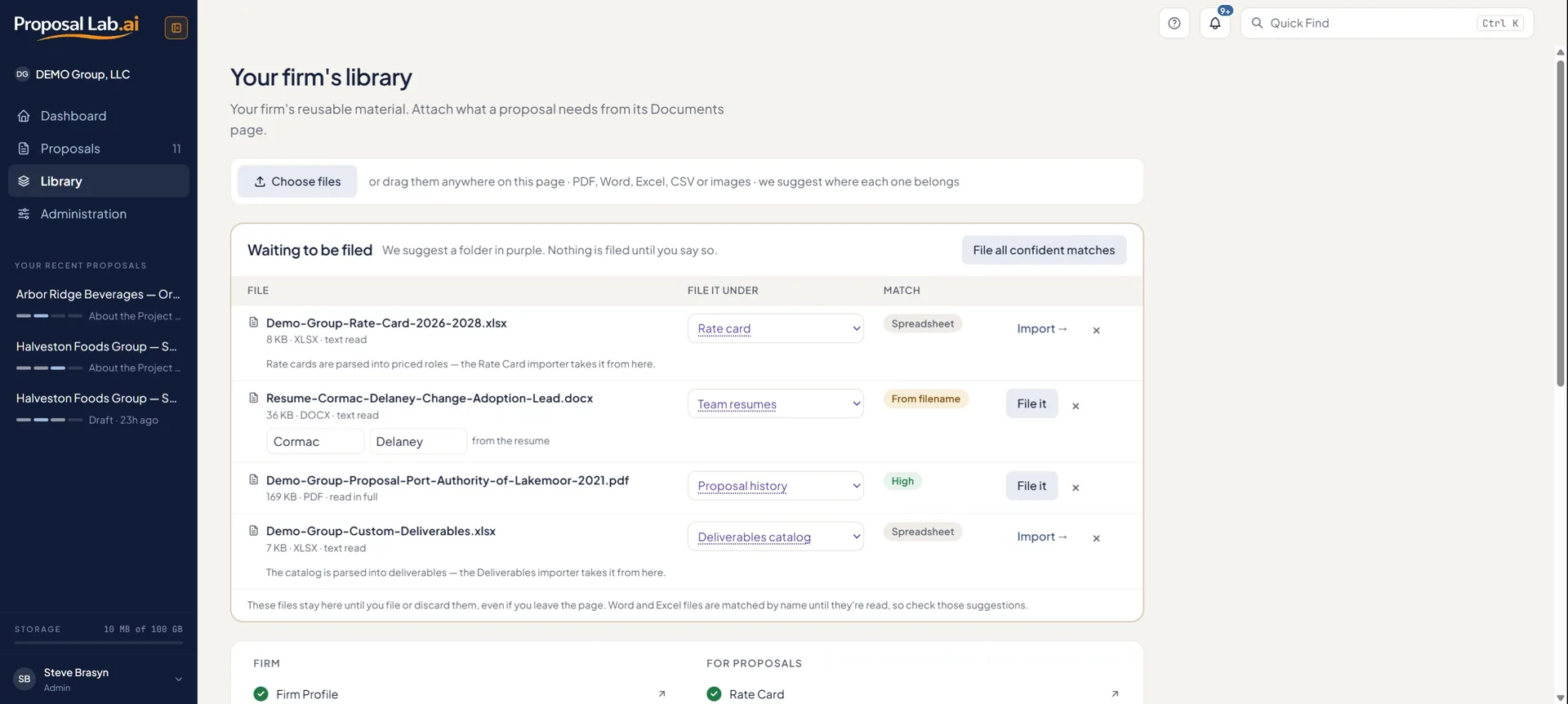
Firm Profile (who you are, your tone and voice, banned and preferred terms) and Branding (logo, colors, fonts, cover design and your own cover photo), plus methodology, qualifications, resumes, past proposals, deliverables, rate card, your own Tables of Contents and standing instructions. Filed once, with Upload files suggesting the folder for each document. The Firm Profile reaches every proposal; everything else, when you attach it.

  • Firm Profile, Branding and Proposal History on every plan
  • Upload files: drop a stack of documents and each is given a suggested folder; rate card and deliverables import as rows
  • Your Word template sets the fonts and colors of every export; the cover carries your logo and, when you add the client's website, theirs too, and your mark heads every page
  • Seven cover designs, or your own Word cover, with your own photo on the cover if you like
  • The covering letter downloads as its own Word file, signed by the person you choose, on a letterhead with your firm's mark
Library: files waiting to be filed, each with a suggested folder
Team

A process your whole team can run.

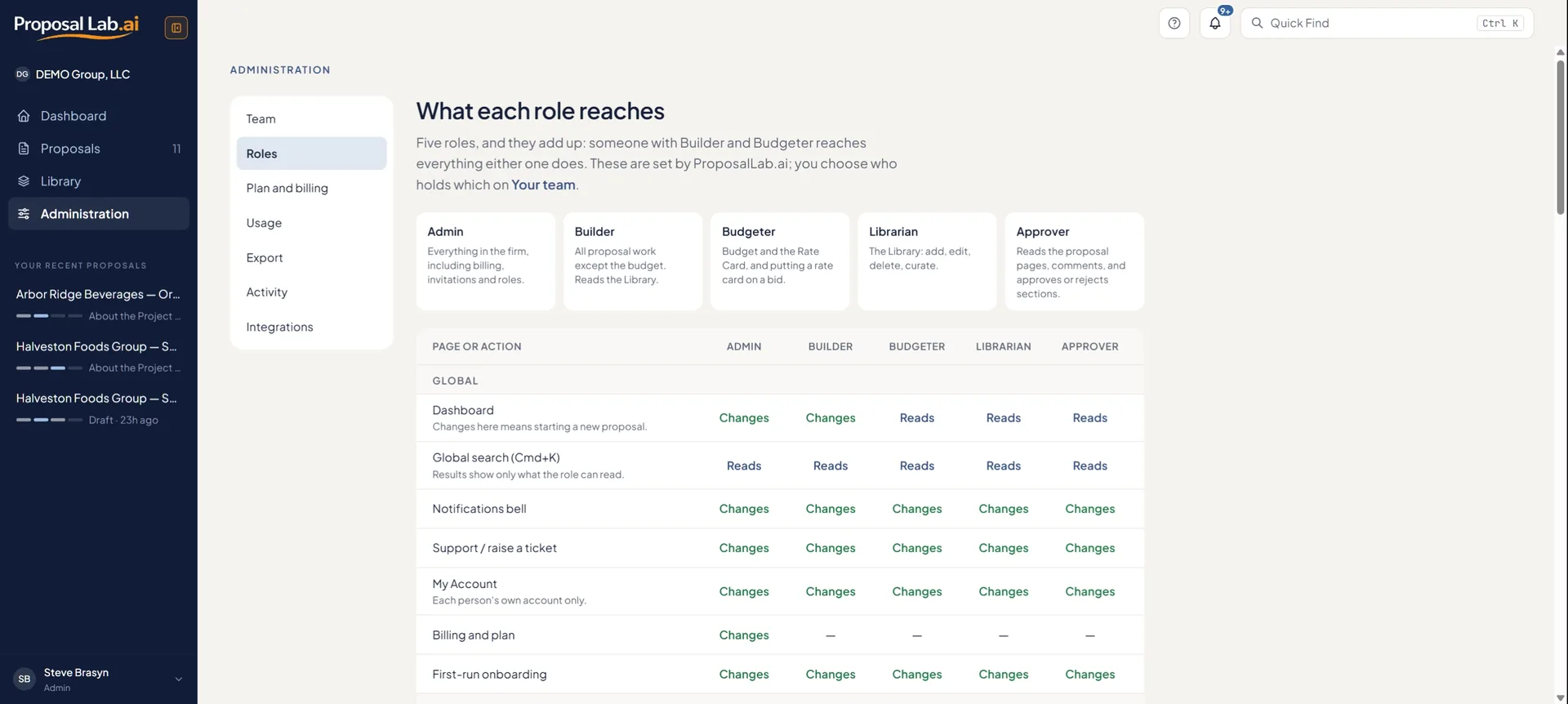
Five roles, additive: Admin, Builder, Budgeter, Librarian, Approver. Invite by email and the invitee lands in your firm with the right roles. Each of the six workflow pages locks when its step is done, and every role change is recorded in Activity.

  • Admin, Builder, Budgeter, Librarian and Approver roles
  • Approvals route to a named approver per section, or one for the whole proposal
  • Activity: who changed roles, who joined and left, and which proposals were deleted or restored, searchable and downloadable as CSV
  • SAML single sign-on: sold on Enterprise, set up per customer after order
  • Integrations with Salesforce and HubSpot will be available on October 16, 2026.
What each role reaches: five roles that add up
Help

Help that knows what page you are on.

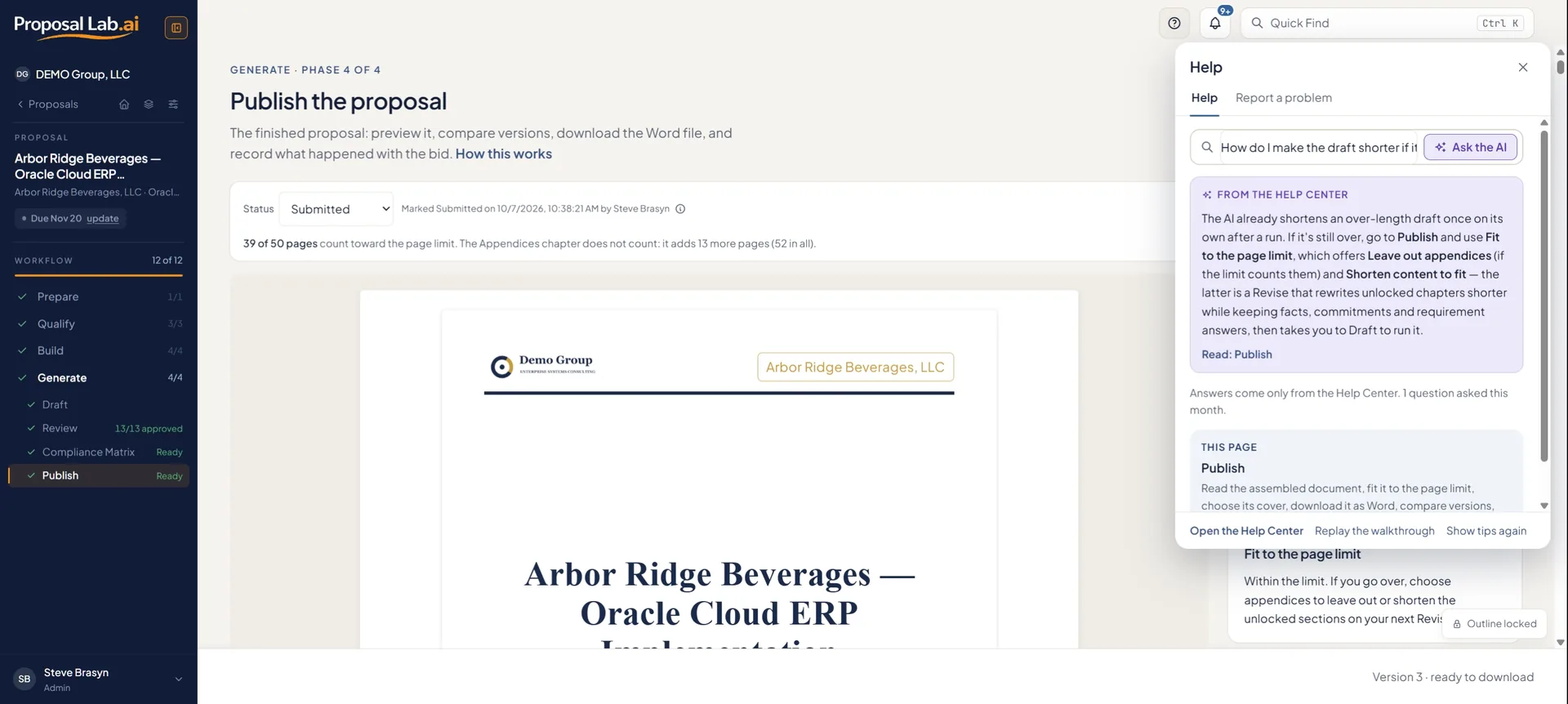
The ? opens help for the page you are looking at. Type a word and it filters the topics; ask a question in your own words and Ask the AI answers from the Help Center, and says so when it can't. A demo workspace, a sample firm you can explore read-only, is one click from your firm's name, and a click-through tour walks the whole product on real screens.

  • Page-aware help, field help, and first-visit tips you can dismiss
  • Ask the AI: answers from the Help Center, with the topic it came from
  • Report a problem from the same panel; a person replies in the app, and by email
  • The training tour: first sign-in to a submitted proposal, in fourteen chapters
Help: a question answered from the Help Center, on the page it was asked

The end of the all-nighter.

See the full workflow on a 14-day free trial.

Start free trial
Pricing

Purpose-built for ERP systems integrators.

Transparent pricing. Every tier is self-serve: pick a plan, pay through Stripe, and start immediately. Or try it free for 14 days, no credit card required.

Try before you buy.

14 days, one proposal, the Pay-per-Use workflow. No credit card required. Word download comes with a paid plan; on day 14 nothing is deleted — the workspace is read-only until you subscribe.

Start free trial

The monthly cost of any plan pays for itself in the hours saved on the first proposal. Knowing every requirement is covered avoids unplanned project cost. And submitting more high quality proposals faster is the key to growing your business.

Pay-per-Use

One proposal at a time, bought when you need it. For individual consultants and one-off bids.

$99/proposal
Paid once. No subscription.
  • 1 proposal — buy the next for $99 when you need it
  • Prepare, confirm requirements, budget, generate, review, publish
  • Budget — rates entered per proposal
  • Firm Profile, Branding and Proposal History
  • Branded Word export

Professional

For solo practitioners and very small firms responding to RFPs regularly.

$179/mo
$149/mo billed annually
  • 3 proposals a month
  • 2 users
  • Invite a colleague — roles and permissions included
  • Budget — rates entered per proposal
  • Everything in Pay-per-Use

Firm

The team workspace. Approvals, Bid Analysis, AI comments on the RFP, the full Library.

$899/mo
$749/mo billed annually
  • 10 proposals a month
  • Up to 25 users, 3 of them admins
  • Full Library and the pipeline dashboard
  • Budget priced from your Library's rate card
  • Chapter approvals — one approver, or one per section
  • Bid Analysis, Win Themes, AI comments on the RFP
  • Edit the AI's text yourself, and place documents word for word
  • Your own Tables of Contents in the Library
  • Activity and data export

Enterprise

The large practice: 100 users, 20 proposals a month, SAML SSO on order, Gantt embedding, the longest retention.

$1,799/mo
$1,499/mo billed annually
  • 20 proposals a month
  • Up to 100 users, 10 of them admins
  • Budget priced from your Library's rate card
  • Gantt and org-chart embedding
  • SAML single sign-on, set up after order
  • Salesforce and HubSpot integrations: available October 16, 2026
  • Longest retention and audit history
  • All prices are USD per month, billed monthly unless annual is selected.
  • Annual billing shown as monthly-equivalent; charged annually upfront.
  • Pay-per-Use is $99 per proposal, bought one at a time from inside the app; no annual discount.
  • Free trial: 14 days, one proposal. No credit card required. Word download requires a paid subscription.
  • The plan buttons connect to Stripe. Access is granted immediately on payment confirmation.
  • SAML single sign-on is sold on Enterprise and set up per customer after order.
  • Integrations with Salesforce and HubSpot will be available on October 16, 2026.
  • User limits include admins. The admin limit is deliberate: it keeps billing and sensitive settings with a few named people.
Feature matrix

What is included in each plan.

FeaturePay-per-UseProfessionalFirmEnterprise
LIMITS
Users (including admins)1225100
Admin users (billing and sensitive settings)11310
Proposals per month131020
PREPARE
About the Project, read from the RFP✓✓✓✓
Documents✓✓✓✓
Gantt and org-chart figures in the draft–––✓
QUALIFY
RFP: read and mark up as a team✓✓✓✓
AI comments on the RFP––✓✓
Requirement extraction and confirmation✓✓✓✓
Bid Analysis––✓✓
BUILD
Table of Contents (the RFP's format, a standard one or your own) and Deliverables✓✓✓✓
Win Themes––✓✓
Budget✓✓✓✓
Rate card in the Library — budgets priced from it––✓✓
GENERATE
AI proposal generation✓✓✓✓
Review✓✓✓✓
Revise or Rewrite, with section locks✓✓✓✓
Questions for you✓✓✓✓
Team comments on the draft✓✓✓✓
AI comments on the draft✓✓✓✓
Chapter approval workflow––✓✓
Compliance Matrix✓✓✓✓
Versions, change report and restore✓✓✓✓
Edit the AI's text yourself––✓✓
Word-for-word documents––✓✓
Branded Word export✓✓✓✓
Firm-level formatting templates––✓✓
LIBRARY
Firm Profile and Proposal History✓✓✓✓
Branding: logo, colors, fonts, cover designs, your own cover photo✓✓✓✓
Upload files––✓✓
Full Library: methodology, qualifications, resumes, rate card, past proposals, deliverables, standing instructions, formatting templates––✓✓
Your own Tables of Contents––✓✓
TEAM
Invite users to the workspace–✓✓✓
Roles and permissions–✓✓✓
Dashboard (full pipeline)––✓✓
Activity––✓✓
Export your proposals as a spreadsheet––✓✓
Email notifications✓✓✓✓
HELP
Page-aware help and Ask the AI✓✓✓✓
Demo workspace and click-through tour✓✓✓✓
ENTERPRISE ONLY
Gantt and org-chart embedding–––✓
SAML single sign-on, set up after order–––✓
Salesforce and HubSpot integrations–––Available October 16, 2026
FAQ

Common pricing questions.

What is the difference between monthly and annual billing?+

Annual billing is shown as a monthly-equivalent rate but charged once per year upfront. It lowers the effective monthly cost on Professional, Firm, and Enterprise. Pay-per-Use does not offer an annual option.

What counts toward proposals per month?+

A proposal counts the first time you generate it. Regenerating it does not count again — each proposal has its own limit of runs, the first included, and the Draft page shows how many remain. The allowance resets with your billing period; unused proposals do not carry over. Pay-per-Use has no monthly allowance: each $99 purchase is one proposal.

What happens at the end of the free trial?+

The trial runs 14 days with no credit card required and includes one proposal — the Pay-per-Use workflow, from the RFP to a finished draft you can read on screen. Word download is disabled until you subscribe. On day 14 nothing is deleted: the workspace becomes read-only until you choose a plan, and your work is preserved.

How does payment work?+

Choose a plan and fill in a short signup form. Confirm your email with the 8-digit code we send, then pay through Stripe. You're in as soon as the payment goes through. No sales calls, no manual provisioning.

What is blocked on the free trial?+

The Word download, and the features that belong to the paid plans above Pay-per-Use: a second user, Bid Analysis, Win Themes, AI comments on the RFP, chapter approvals, editing the AI's text, word-for-word documents, the full Library, the pipeline dashboard, and Activity and export. Everything in the Pay-per-Use workflow (About the Project, Documents, RFP, Requirements, Table of Contents, Deliverables, Budget, the draft, Review with AI and team comments, the Compliance Matrix and the on-screen proposal) works on the one free proposal. To see the paid features in use, open the demo workspace from your firm's name in the sidebar: a sample firm to explore, read-only, on every plan.

Can I downgrade or change tiers later?+

Yes. You can move between tiers. Downgrades take effect at the end of the current billing period. Anything already over the new plan's limits stays; you cannot add more until you are back within them.

I need more than 100 users, more than 20 proposals a month, or custom limits.+

That is what Enterprise is for. Talk to the founder about volume pricing, custom limits, and pre-SOC 2 NDA review. SAML SSO is set up per customer on Enterprise.

About the product.

What is ProposalLab.ai?+

Proposal software for ERP systems integrators and consulting firms. It reads the RFP or customer requirements documents, has your team confirm the requirements, scores whether to bid, and allows users to set the table of contents and build the budget before anything is written. The AI then drafts the whole proposal from those inputs and checks it against each in-scope requirement. Built by Brasyn LLC in Bellevue, Washington.

Which ERP platforms does it support?+

ProposalLab.ai can support proposal creation for essentially any ERP system, including SAP S/4HANA, SAP ECC, Oracle Cloud ERP, Oracle EBS, PeopleSoft, Infor, Microsoft Dynamics 365, Workday, NetSuite, Acumatica, Deltek, and many others. The platform and the engagement type (new implementation, upgrade or migration, module add-on, support or managed services, assessment, or staff augmentation) shape the draft's phases and length.

Is our data used to train AI models?+

No. Every AI feature runs on Anthropic's Claude models through Anthropic's commercial API, whose terms exclude your data from model training, and no other AI provider is used. ProposalLab.ai is a multi-tenant application where each firm's records are separated in the database, so one firm's users can't read another firm's data.

Will the AI make up facts about our firm?+

It's clearly and firmly instructed not to. When a draft needs a fact only your firm has, such as a reference, a certification or a person's name, it asks you a numbered question instead. Every page of the download is marked DRAFT until each question is answered or dropped. The AI is never given your internal cost rates or margin, which are calculations inside your tenant in the application.

How does it make sure every requirement is answered?+

Requirements are extracted from the RFP and any requirements document you attach, duplicates are merged, and your team confirms the list, including a user-led de-duplication process. After each run, the Compliance Matrix marks every in-scope requirement Met, Partial or Not Met. The run then closes the gaps your documents support and turns the rest into questions for you.

What file types can I upload?+

The RFP as PDF or Word (.docx). Save an old .doc as .docx first. Supporting and requirements documents can also be Excel, CSV or plain text, and the rate card and deliverables list import from a spreadsheet, PDF or Word file.

What do I get at the end?+

A Word document using your Word template's fonts and colors and your selected brand settings. The cover letter downloads as its own Word file, every run is saved as a version, and a proposal change report shows what changed between versions. To get a PDF version, open the Word document and print it in the PDF format.

Does it handle page limits?+

Yes. After writing, it lays out the real pages, and if the draft is over the limit (yours, the RFP's, or a default for the engagement type), it shortens it once on its own. Appendices don't count unless you say they do, and you can run Shorten to fit again from Publish.

How is it different from using ChatGPT or Claude directly?+

A chat assistant writes from whatever you type into it and is very susceptible to creating its own facts. ProposalLab.ai generates proposal content from well-organized and structured rules and inputs that guide and restrict what the AI writes: the requirements, table of contents, win themes, budget, firm profile and attached documents, all reviewed and locked by your team. It uses these inputs predictably every time, plans the whole proposal first, writes each chapter from that plan, and runs multi-layer quality checks on the draft and the processes that feed it, including a check of the finished draft against the requirements.

Is ProposalLab.ai SOC 2 certified?+

Not yet. The SOC 2 Type II engagement begins in January 2027, and we won't claim SOC 2 until the report is issued. A written Security Controls Overview is available under a mutual NDA.

Can our whole team work on a proposal?+

Yes, on plans with more than one user. Each person holds any mix of five roles (Admin, Builder, Budgeter, Librarian and Approver), enforced by the database, not just the screens. Depending on the plan, your team comments on the draft, and sections go for approval to a named approver, one per section or one for the whole proposal.

Does it connect to our CRM or document stores?+

Integrations with Salesforce and HubSpot will be available on October 16, 2026, on the Enterprise subscription. There are no connectors to SharePoint, Google Drive or similar. You attach the documents each bid needs, and your Library keeps what you reuse.
How we compare

Proposal software for firms that take proposals seriously.

Here is how we are different. An honest, side-by-side look at the alternatives.

DimensionProposalLab.aiAI-native response tools (Inventive, 1up, DeepRFP, AutoRFP)Generic AI (ChatGPT / Claude)Legacy tools (RFPIO / Loopio / Responsive)
Where it startsBefore the decision to bid. Read the RFP, confirm the requirements, score the fitSome qualify first: Inventive and AutoRFP offer a go/no-go check, and DeepRFP a bid/no-bid recommendation. Then connect your content and start answeringWherever you pasteMainly after the decision; the library is the product. Responsive adds a fit score, and Loopio a proposal summary for go/no-go
What it writesA whole proposal, chapter by chapter, from one plan, following the response format the RFP prescribes or your own custom formatMostly answers, one question at a time (Inventive, 1up, AutoRFP); DeepRFP also drafts proposalsWhatever you promptAnswers drafted one question at a time from the library, now with AI
Purpose-built for ERP SIsYes. The only known proposal creation product focused on ERP systems integrators, with methodology, phases and deliverables shaped by the ERP platform and engagement typeNo. Horizontal — sales enablement and proposal teams in any industryNo. Generic; you supply all contextGeneric horizontal tool; not ERP-specific
RFP analysis to structured requirementsBuilt-in, traceable to compliance matrixMostly answers question by question from past responses; DeepRFP extracts requirements into a compliance matrix, and AutoRFP and Inventive have requirement-extraction or compliance agentsManual prompting; output not structuredLibrary-driven; Responsive's fit analysis surfaces key requirements and risks
Bid / no-bid scoringBuilt-in. A weighted score across six areas; each area names the Library documents and people behind it, and values read from the RFP show the passage they came fromInventive's Go/No-Go Agent scores fit; AutoRFP screens for deal-breakers; DeepRFP gives a bid/no-bid recommendationOnly if you prompt for itResponsive offers a fit score and a bid/no-bid scorecard; Loopio supports go/no-go from a proposal summary
Budget (labor, travel and expenses, contract type, calendar)The built-in tool generates monthly budget detail and drives the pricing section of the proposal. You load rates by role, identify holidays, and define travel and other costs. Your cost rates and margin never reach the AI.Not availableNot availableLimited; usually external
Compliance matrixChecked automatically after every completed draft, once the run has closed the gaps it can. The proposal can include the Compliance Matrix as an appendix, and you can download it to Word or Excel.Varies: DeepRFP builds compliance matrices and reviews drafts for compliance; we found none that re-checks the whole draft automatically after every runNot availableResponsive exports a traceability matrix
Approval workflow (chapter-level)Built-in, and turned on or off for each proposal. Sign-off by one approver for the whole proposal, or one for each chapter. Notify approvers sends each person the sections to read; only the named approver can approve, and an approved chapter is locked so no later run rewrites it.Assign, review and approve (Inventive); no chapter-by-chapter approval foundNot availableMulti-step reviews and approvals (Loopio, Responsive)
Regenerating a draftVersion control, with a change report you can download as a Word file with tracked changes, listing the notes, gaps and changed inputs each run was given. You can restore any earlier version to become the current version.Version control (Inventive); no per-run account of what the AI changed and whyStart again from the promptVersion history and an audit trail; no account of what the AI changed or why
Facts only your firm hasWhen the AI needs facts it does not have, it will insert a “Question for you” comment explaining what you need to supply to resolve the gap.Inventive flags gaps rather than inventing an answer; DeepRFP checks drafts for missing information. No gate before submission foundUp to you to spotNot found on their public pages
Page limitMany bids have a page count restriction, and we address it. ProposalLab.ai counts the real pages after writing, and shortens an over-length draft once, on its own, without touching locked sections, to meet the page cap.Not found on their public pagesUp to youNot found on their public pages
OutputA finished, branded Word document, styled from your firm’s branding information (logo, colors, font, page formatting, etc.) that you provide and select when preparing the proposal draft.Mostly a set of answers, with questionnaires and DDQs the strength; DeepRFP also drafts proposal responses in WordText, or a Word file you format yourselfAssembled from library content
Integrations (CRM)Integrations with Salesforce and HubSpot will be available on October 16, 2026.Salesforce and HubSpot (Inventive, AutoRFP)A HubSpot connector (Claude); nothing proposal-specificSalesforce (Loopio, Responsive)
Output quality on first draftHigh. The AI writes under a written rulebook, and layers of quality checks run before, during and after every draft: locked inputs, required-content checks on each chapter, a fact check that flags any claim your documents don’t support, compliance gaps closed from your documents, page-limit fitting and others.Good where your past answers are goodVariable; depends entirely on prompt rigorGood where the library is good; AI drafts from approved content
Setup timeStarts as soon as the RFP is dropped in. There is no configuration or setup required. Subscribe, sign in, add the RFP or requirements, and then add the supporting information used in proposal generation.Connect your content sources and import past responses firstNothing to set up, but every proposal starts from zeroBuild and maintain a content library before you start

Compared from each vendor's public pages, as of October 2026.

Quality

The checks in every run.

Before the AI writes

  • Your team confirms and locks the inputs (requirements, table of contents, win themes, deliverables and budget), and the run won’t start until they’re locked.
  • Everything is read whole. An input too large to read is refused and refunded, never silently cut.
  • Your standing instructions are screened before they’re used.

While it writes

  • A written rulebook: never invent a fact, never state your cost rates or margin.
  • Each chapter is checked for its required parts and the outline’s sub-headings, and repaired if anything is missing.
  • A fact only your firm has becomes a numbered question for you, asked once.
  • A consistency check across chapters, and a source check that flags any claim no document supports.
  • The draft is checked against every in-scope requirement, and the gaps your documents can close are closed.
  • The real pages are counted, and an over-length draft is shortened.

After it writes

  • The Compliance Matrix scores the finished draft automatically.
  • A completeness report and a readiness list show what needs you.
  • Every page is stamped DRAFT, and Submitted is blocked, until your questions are settled.

See where the rigor shows up.

Start a 14-day free trial and run your next RFP through it.

Start free trial
Founder story

Built by someone who has been on every side of an ERP proposal.

Thirty years writing, reviewing, and judging.

For thirty years I have been on every side of an ERP proposal. I have written them at 2 a.m. the night before a deadline. I have reviewed them as a partner, marking up junior drafts until the margins ran out of room. And I have judged them on selection committees for SAP, Oracle, Workday, and PeopleSoft — watching firms with real expertise lose to firms that simply wrote a clearer document.

The pattern never changed. A team receives an RFP, waits two weeks, then panic-writes for two more. Pricing gets guessed on a Friday. Half the RFP requirements get skimmed. The document goes out. Sometimes it wins. More often it does not, and nobody quite knows why. The problem was never a lack of talent. The problem was that the proposal process had no structure.

Then the AI tools arrived and made it worse. They optimized for generation and skipped the part that actually mattered — the structured thinking that happens before a word gets written. The result was fluent, confident, generic proposals. Selection committees recognized them immediately. I know, because I was one of them.

"The answer was never more AI. It was more rigor, then AI. Front-load the structured work, and the output is dramatically better because the inputs are dramatically better."

ProposalLab.ai makes you do the work that matters before the AI writes a word. RFP analysis, outline, budget, compliance mapping — all as structured constraints the AI writes from. The output is on-brand, on-budget, and on-spec. That is the difference rigor makes.

I built this for every firm that takes proposals seriously: the large practice whose bid crosses six desks and needs one place where review and approval actually happen, and the smaller firm that wins on expertise and has to out-prepare competitors with ten times the staff. Both know a good proposal is not about writing faster. It is about thinking clearly, and then writing well.

"It's always easier to critique than create."

ProposalLab.ai exists so that the work you are good at — the thinking, the judgment, the client you understand better than anyone else bidding — is what your proposals are made of, and the rest takes hours instead of nights. I trust it will help you win more of the work you want and grow your business faster, with less of it spent at 2 a.m. I wish you every success in your growth journey.

— Steve Magnusson
Founder, ProposalLab.ai

Start free trial See it work
Compliance & security

What is true today. And what is scheduled.

We will not claim a certification we do not have. Here is exactly where things stand.

Available today

Role-based access

Five additive roles — Admin, Builder, Budgeter, Librarian, Approver — enforced in the database, not only in the interface. Every role change is recorded in Activity.

Activity log

Role changes, people joining and leaving, and deleted and restored proposals are recorded in Activity, which an Admin can search and download as CSV. The record is kept for a period that depends on the plan, up to three years on Enterprise.

Encryption

Data encrypted in transit and at rest.

Per-tenant isolation

Your firm's data is isolated per tenant at the database level. Proposals are never used to train AI models.

SAML single sign-on

Sold on the Enterprise tier and set up per customer after order — a metadata exchange with your identity provider.

On the roadmap

SOC 2 Type II

The SOC 2 Type II engagement begins in January 2027. Until the report is issued we will say so, and share our controls under NDA on request.

Salesforce and HubSpot

Integrations with Salesforce and HubSpot will be available on October 16, 2026. The sub-processor list and this page are updated when they ship.

Data handling

Generation, RFP analysis and review run on Anthropic's Claude models through the commercial API, whose terms exclude your data from model training. Data is tenant-isolated and encrypted in transit and at rest.

When a subscription lapses the workspace becomes read-only, then is retained for a window that depends on the plan — from 30 days to a year — so you can export it; after that, proposal content is purged. Billing and audit records are kept as the law requires. You can ask for deletion at any time at support@proposallab.ai.

A written Security Controls Overview — what is enforced where, and the evidence a reviewer can ask for — is available under a mutual NDA. Ask for it below.

Contact the security team
About

Built by an ERP proposal veteran.

ProposalLab.ai is proposal software for ERP systems integrators. It adds rigor to the preparation stage so AI can reliably generate high-quality, branded, compliant proposals. Built on 30 years of writing, reviewing, and judging ERP proposals across SAP, Oracle, Workday, and PeopleSoft.

ProposalLab.ai is built by Brasyn LLC in Bellevue, Washington, and led by its founder, Steve Magnusson. Support is answered by a person: support@proposallab.ai.